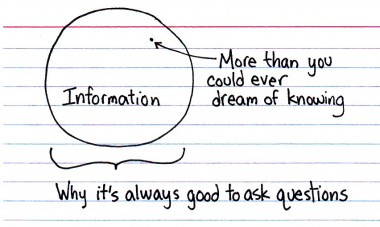
Jessica Hagy's blog is my favourite coffee break treat (especially when Costa runs out of everything - most distressingly chocolate goodness). Polhill Campus has a large group of Spanish teenagers in this week...
Tuesday, 12 July 2011
Tuesday, 17 May 2011
Using Prezi: the 'Big' picture
These are some notes I will be using for the LivTeachMeeting at the University of Liverpool on 26 May 2011. I am posting them here in case they are useful for anyone else.
Website
http://prezi.com. The public license version is free. The minor downside is that you cannot 'lock' your prezis so they are private. However, you can stop people copying them.
How to create a great Prezi by Adam Somlai-Fischer (one of the original developers)
Excellent prezi which summarises the main features and how to use it successfully
http://prezi.com/vbl7rvw_t7rc/copy-of-how-to-create-a-great-prezi/
Easy to include images, videos etc
Good on big screens
Cloud storage (no memory stick!)
Sharing with colleagues & clients (Twitter, embedding etc)
Bad points
Motion sickness (if overdone or small screen)
Can look a bit slapdash (eg pixellated images when you)
Site has basic search & no tagging
Needs good browser (updated & Flash)
Not suitable for step-by-step, detailed instruction
Might lose novelty value in future
No automatic handout
How we use it
All in all it is excellent for 'Welcome' talks during Induction week, outside of the library. (Vast lecture room; hours of powerpoint presentations; team teaching; quick overview). Courses include Education, Social Work, PE and Sport.
I plan to create quick teaser adverts for a resource (like RefWorks or ejournals bundle) to run on auto before and after lectures.
Notetaking - I saw an audience member use this at a Business Link course recently. They said (1) they were going to cascade to colleagues later and (2) it is really popular with people who don't like text.
Some resources
The Learn section of the Prezi website is excellent. There are cheatsheets and videos. When they say you can learn it in 10 minutes, they're not kidding! But these are some of the other resources my team looked at too:-
Website
http://prezi.com. The public license version is free. The minor downside is that you cannot 'lock' your prezis so they are private. However, you can stop people copying them.
How to create a great Prezi by Adam Somlai-Fischer (one of the original developers)
Excellent prezi which summarises the main features and how to use it successfully
http://prezi.com/vbl7rvw_t7rc/copy-of-how-to-create-a-great-prezi/
Overviews & connections
Speed to put together
The 'wow' factor
Non-linearEasy to include images, videos etc
Good on big screens
Cloud storage (no memory stick!)
Sharing with colleagues & clients (Twitter, embedding etc)
Bad points
Motion sickness (if overdone or small screen)
Can look a bit slapdash (eg pixellated images when you)
Site has basic search & no tagging
Needs good browser (updated & Flash)
Not suitable for step-by-step, detailed instruction
Might lose novelty value in future
No automatic handout
How we use it
All in all it is excellent for 'Welcome' talks during Induction week, outside of the library. (Vast lecture room; hours of powerpoint presentations; team teaching; quick overview). Courses include Education, Social Work, PE and Sport.
I plan to create quick teaser adverts for a resource (like RefWorks or ejournals bundle) to run on auto before and after lectures.
Notetaking - I saw an audience member use this at a Business Link course recently. They said (1) they were going to cascade to colleagues later and (2) it is really popular with people who don't like text.
Some resources
The Learn section of the Prezi website is excellent. There are cheatsheets and videos. When they say you can learn it in 10 minutes, they're not kidding! But these are some of the other resources my team looked at too:-
- Zuilab's Channel on YouTube is also a good source:: http://www.youtube.com/user/zuilabs.
- Prezi for Dummies Cheat Sheet by Stephanie Diamond: dummies.com/how-to/content/prezi-for-dummies-cheat-sheet
- Two page overview. A Quickstart Guide by RJ Tarr: activehistory.co.uk/Miscellaneous/free_stuff/worksheets/Prezi.pdf
Labels:
induction,
learning technology,
LivTeachMeet,
presentations
Wednesday, 23 March 2011
RFID is coming soon
Did you know that if you have requested a Putteridge Bury book in the last year, it came with an RFID tag? Putteridge was the first library in the University to be converted and this Spring all the other libraries are also making the switch. The dates and details are set out on this LRWeb's "RFID is coming soon" page.
RFID is used a lot in retail; shops can quickly track what stock is where (M&S use it a lot, apparently). Your student ID badge is RFID-ed already. In the library sector, RFID is really being introduced to benefit customers. Basically, instead of having to scan barcodes (either at the self-service machines or at the desk) for each book, RFID machines can read an unopened pile and automatically and issue each item to your card. Very quick and simple.
It is very popular in other university libraries like UEA, Nottingham and Swansea. I was going to add a video of a system in operation here but a quick search of YouTube has revealed lots of different machines and kit so I don't want to confuse you with a demonstration of the wrong one! There will be lots of publicity and help available in the library when the system goes live.
The returns machine outside the library entrance will still be available.
RFID is used a lot in retail; shops can quickly track what stock is where (M&S use it a lot, apparently). Your student ID badge is RFID-ed already. In the library sector, RFID is really being introduced to benefit customers. Basically, instead of having to scan barcodes (either at the self-service machines or at the desk) for each book, RFID machines can read an unopened pile and automatically and issue each item to your card. Very quick and simple.
It is very popular in other university libraries like UEA, Nottingham and Swansea. I was going to add a video of a system in operation here but a quick search of YouTube has revealed lots of different machines and kit so I don't want to confuse you with a demonstration of the wrong one! There will be lots of publicity and help available in the library when the system goes live.
The returns machine outside the library entrance will still be available.
Tuesday, 22 March 2011
Cambridge Science Festival
The Cambridge Science Festival opens today. Events are open to the public and there is a varied programme. For more details follow this link: Cambridge Science Festival 2011.
Teaching resource books
If you have ever wondered how publishers plan, publish and adapt teaching resource books, you may find this talk by Mark Bloch (who used to be a teacher himself) from Pearson interesting. The 30(ish) minute talk discusses how Pearson's ActiveTeach evolved from photocopyable, spiral-bound books, to CD-Roms and onwards to interactive whiteboards etc.
Friday, 18 March 2011
Wireless based printing - a trial
We are trialing a wireless based printing service called EveryonePrint that will allow students and staff to send print jobs direct from their PC, Mac, laptop, or mobile device via a web interface or email attachment to the PCounter printing system.
The url is http://webprint.beds.ac.uk and users will need to login with their usual network username and password.
There is a simple browse function and supported files are Office files, PDF and text files. At present JPG, GIF etc are NOT currently supported so it will be necessary to place them in eg a Word document first.
Submission via email allows any file attachments to be submitted automatically to webprint@beds.ac.uk after an initial email registration process. Multiple email addresses can be used.
Once the job is submitted the user is presented with a choice of either mono or colour print queue and the option to print multiple copies or duplex. Options such as multiple pages as with Powerpoint will need to be printed in the conventional way from the software on a normal student / staff PC.
The print job, if successful will be processed and placed into the normal PCounter queue, ready for collection in the normal way.
The trial is operating until the end of March and we would really like to hear what you think of the service, so please send any comments to library.technical@beds.ac.uk
The url is http://webprint.beds.ac.uk and users will need to login with their usual network username and password.
There is a simple browse function and supported files are Office files, PDF and text files. At present JPG, GIF etc are NOT currently supported so it will be necessary to place them in eg a Word document first.
Submission via email allows any file attachments to be submitted automatically to webprint@beds.ac.uk after an initial email registration process. Multiple email addresses can be used.
Once the job is submitted the user is presented with a choice of either mono or colour print queue and the option to print multiple copies or duplex. Options such as multiple pages as with Powerpoint will need to be printed in the conventional way from the software on a normal student / staff PC.
The print job, if successful will be processed and placed into the normal PCounter queue, ready for collection in the normal way.
The trial is operating until the end of March and we would really like to hear what you think of the service, so please send any comments to library.technical@beds.ac.uk
Tuesday, 15 March 2011
Teacher Reference Center
The Library has recently acquired access to the database 'Teacher Reference Center' from Ebsco.
Teacher Reference Center provides indexing and abstracts for 280 periodicals. In addition, 96% of journals indexed in the database are peer-reviewed. Topics include: Assessment, Best Practices, Continuing Education, Current Pedagogical Research, Curriculum Development, Elementary Education, Higher Education, Instructional Media, Language Arts, Literacy Standards, School Administration, Science & Mathematics, and Teacher Education.
It's available here or via our subject guides.
Remember that you can cross search multiple databases on the Ebsco platform by selecting the 'choose databases' option.
Any problems, please contact your Academic Liaison Librarian.
Teacher Reference Center provides indexing and abstracts for 280 periodicals. In addition, 96% of journals indexed in the database are peer-reviewed. Topics include: Assessment, Best Practices, Continuing Education, Current Pedagogical Research, Curriculum Development, Elementary Education, Higher Education, Instructional Media, Language Arts, Literacy Standards, School Administration, Science & Mathematics, and Teacher Education.
It's available here or via our subject guides.
Remember that you can cross search multiple databases on the Ebsco platform by selecting the 'choose databases' option.
Any problems, please contact your Academic Liaison Librarian.
Subscribe to:
Posts (Atom)